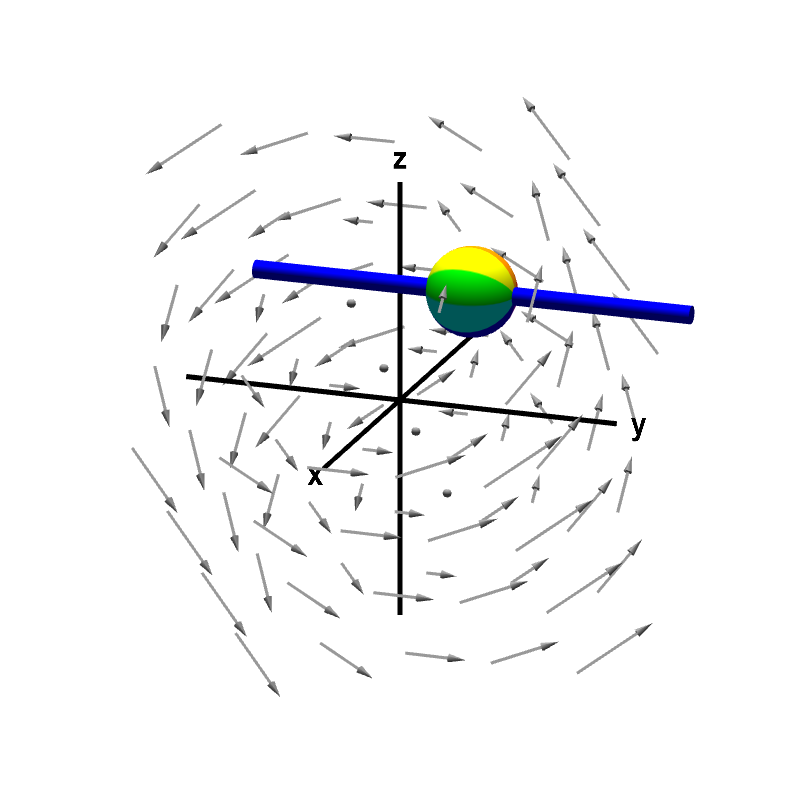
Applet: A nonrotating sphere on a rod shows no y-component of curl
Applet loading
The rod constrains the rotation of the sphere to point (using the right hand rule) in either the positive or negative $y$ direction. The speed of this rotation corresponds to the $y$-component of the curl. In this case, the sphere does not rotate, indicating the $y$-component of the curl is zero.
This vector field is $\dlvf(x,y,z)= (-y,x-z,y).$ Its curl is \begin{align*} \curl \dlvf(x,y,z) &= \left(\pdiff{}{y}y-\pdiff{}{z}(x-z), \pdiff{}{z}(-y)- \pdiff{}{x}y, \pdiff{}{x}(x-z) - \pdiff{}{y}(-y) \right)\\ &=(2,0,2). \end{align*} In particular, the $y$-component corresponding to the sphere's (lack of) rotation is 0. Since the $y$-component of the curl is zero everywhere, the sphere does not spin no matter where you move it.
Applet links
This applet is found in the pages
General information about three.js applets
The applet was made using three.js and requires Javascript as well as a browser that supports WebGL. For most three.js applets, you can drag with the mouse to rotate the view, drag with the right button to pan, and zoom in/out with the mouse wheel. Many applets contain points that you can drag to change values of variables.